Redirecting a URL is an essential task for any webmaster. Imagine you have reorganized your website and the old URL no longer exists; without redirects, visitors would encounter 404 errors and you would lose valuable traffic. Redirects ensure that both visitors and search engines can find the right content, keeping your site efficient and optimized.
There are different redirection methods, each with its own specific advantages and uses. Here we explore three popular ways to redirect a URL.
cta:domains
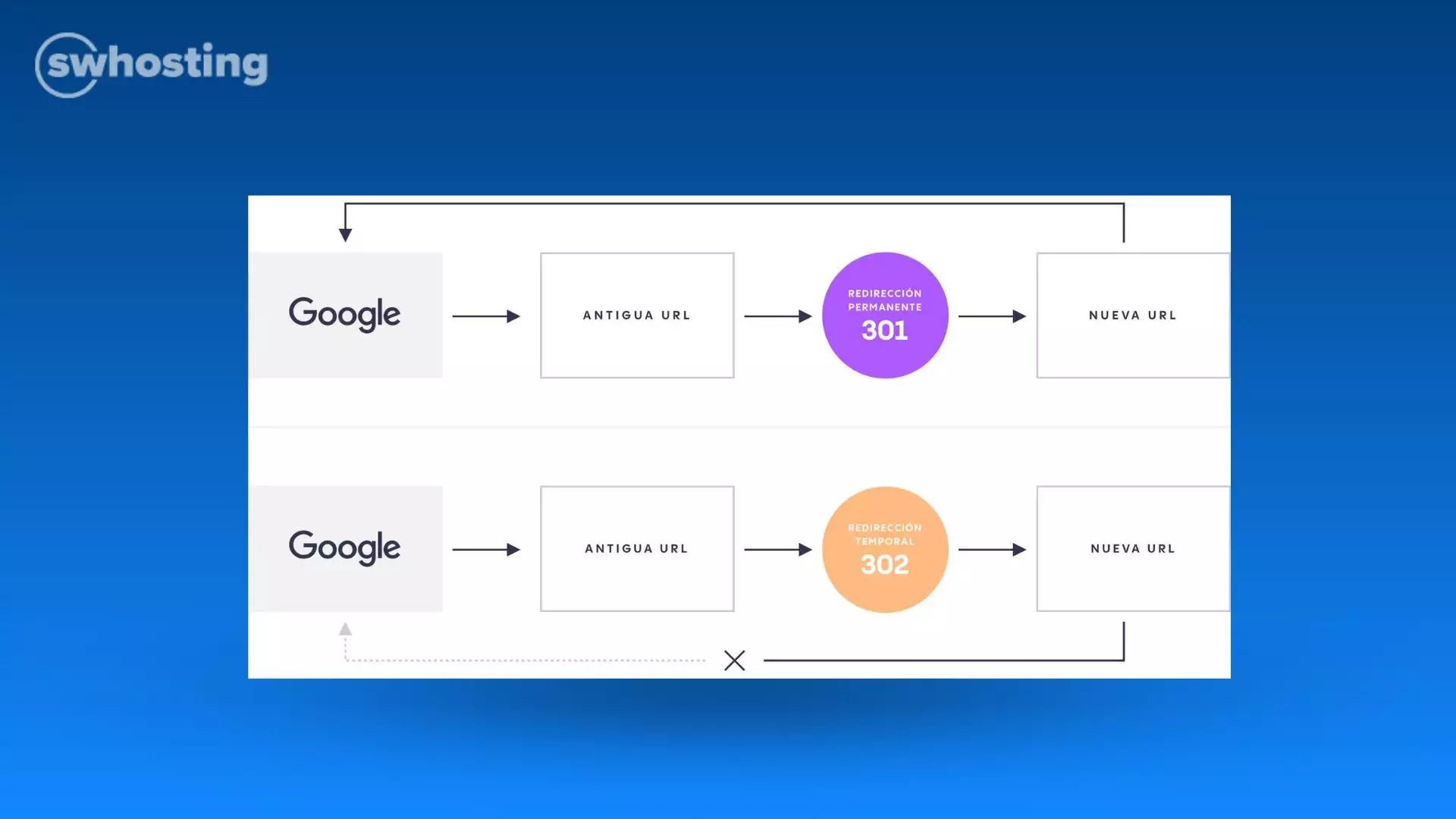
A 301 redirect is most commonly used when content has been permanently moved to a new URL. This redirect not only sends users to the new destination, but also passes almost all SEO value from the old URL to the new one. Search engines like Google interpret this redirect as a permanent change, which helps maintain the ranking and visibility of the new page. This is crucial if your old URL has valuable backlinks that contribute to your site's search engine ranking.
In Apache: It is done through the .htaccess file, located in the root of the web server. Add the following line:
Redirect 301 /old-url https://www.example.com/new-url
In Nginx: Modify the server configuration file:
server {
    location /old-url {
        return 301 https://www.example.com/new-url;
    }
}
In WordPress: You can use plugins like Redirection to handle redirects without editing files directly.
Example: Suppose you have changed your blog URL from /blog to /articles. The redirect would look like this:
Redirect 301 /blog https://www.example.com/articles
In WordPress: You can use plugins like Redirection to handle redirects without editing files directly.
Example: Suppose you have changed your blog URL from /blog to /articles. The redirect would look like this:
Redirect 301 /blog https://www.example.com/articles
A 302 redirect tells search engines and users that the change is temporary. This redirect does not pass the SEO value of the old URL to the new one, as the original URL is expected to be available again in the future. Although it is useful for temporary changes, avoid using the 302 redirect for permanent site restructurings, as not passing the SEO value may confuse search engines.
In Apache: Add the following line to the .htaccess file:
Redirect 302 /old-url https://www.example.com/new-url
In Nginx: Modify the server configuration file:
server {
    location /old-url {
        return 302 https://www.example.com/new-url;
    }
}
Example: Imagine your special offers page is temporarily down and you want to redirect visitors to the main offers page:
Redirect 302 /special-offers https://www.example.com/offers
Meta Refresh redirection is performed directly in the HTML of a page and is a method that uses a special meta tag to redirect visitors to another URL after a specific time interval. Although it is not the most recommended method from an SEO point of view, as search engines may not treat it with the same seriousness as a server redirect, it can be useful in situations where a controlled and temporary redirect is required. Meta Refresh redirection, too, can be useful when you do not have access to the server to configure server-side redirects, such as on shared hosting platforms or static sites without access to the .htaccess file or Nginx configuration.
In HTML: Add the following meta tag in the <head> section of your page:
<meta http-equiv="refresh" content="5;url=https://www.example.com/new-url">
The value 5 indicates the number of seconds the browser will wait before redirecting. It can be adjusted as needed.
Example: To redirect users after 3 seconds, the code would be:
<meta http-equiv="refresh" content="3;url=https://www.example.com/new-url">
Redirects are essential for maintaining the navigability and integrity of your website. The 301 redirect is the safest and most effective option for permanent changes, ensuring that both users and search engines recognize and update old links. The 302 redirect is useful for temporary changes without affecting the structure of your site in the long term. Finally, the Meta Refresh redirect offers a quick solution for situations where the server configuration cannot be accessed.
Each method has its applications and benefits, so it is crucial to select the most suitable one according to the needs of your project. Implementing redirects correctly not only improves the user experience, but also protects and potentially improves your search engine rankings.
cta:hosting


